
PRGRM GUIDE / 4 min read
Review your program in Analyze
Review weekly progression, movement balance, muscle workload, and prescription checks.
Choose your view
Select Analyze in the workspace header. Choose Program overview in the left navigator for the whole plan, or select a phase, week, or session for a closer view.
In the program overview, use Displayed week to change the week detail. Check the selected scope before comparing values.
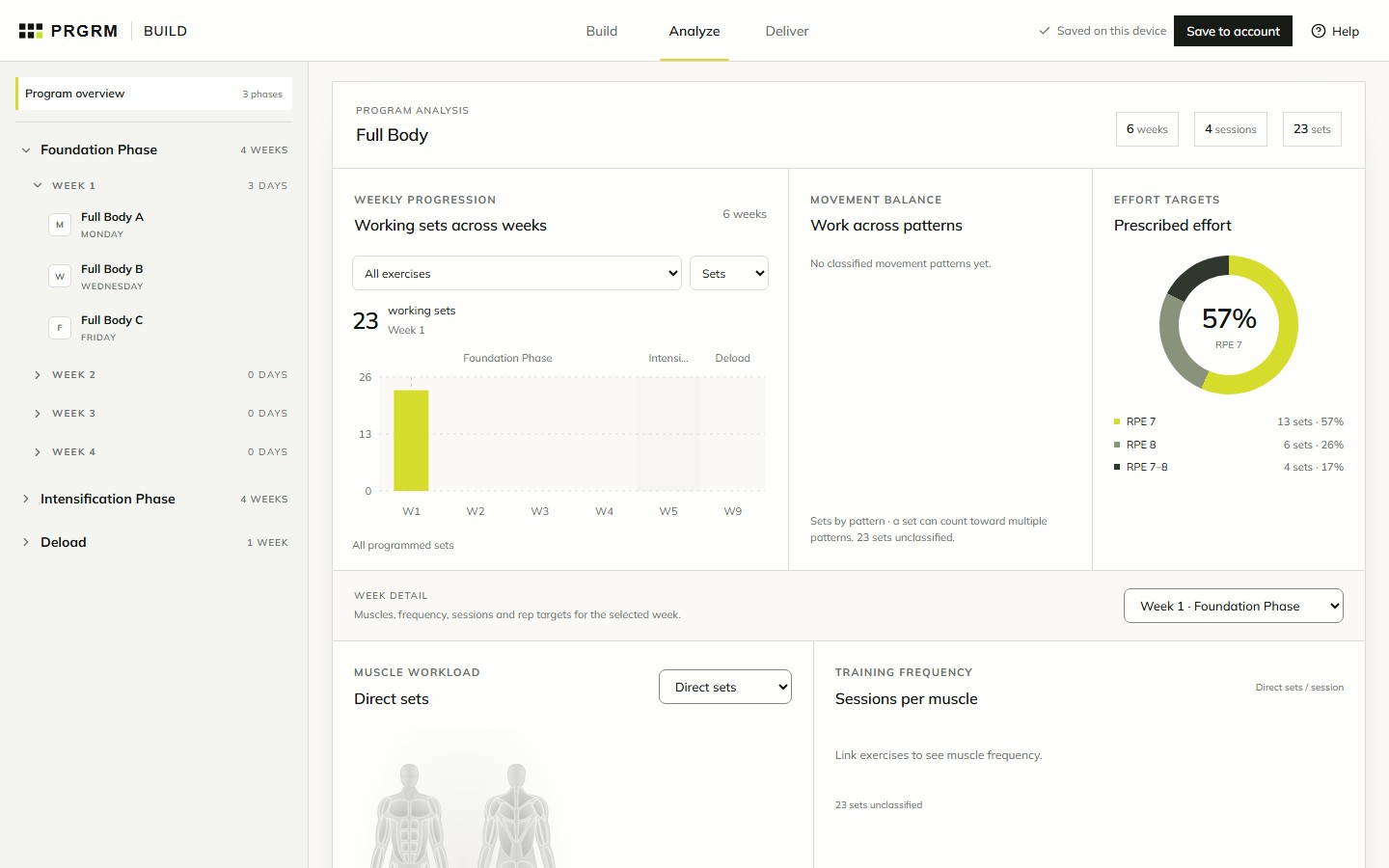
Read workload and progression
- Weekly progression: compare working sets across weeks. Select an exercise and metric to inspect its prescribed progression.
- Movement balance and effort targets: review how the plan distributes work across movement patterns and intensity targets.
- Week detail: inspect muscle workload, training frequency, working sets by session, and rep targets. Switch between direct, indirect, stabilizing, and other muscle roles.
- Review findings: examine input checks, workload changes, and planned progression. Follow the affected-exercise or comparison controls to investigate a finding.
Analyze describes your prescriptions. For completed workouts and actual performance, use TRAIN and Training progress.
Check the inputs
Muscle and movement summaries depend on exercises being linked to the catalog. Unlinked exercises still contribute prescribed sets, but cannot provide structured muscle information. Read the unclassified-set counts and input checks before drawing conclusions.
Return to Build to complete the relevant sessions or prescriptions, then review Analyze again.